
AI Mockup Generator for Print on Demand
Self-Hosted AI SaaS Stack – How I Built an AI Mockup Engine for Print on Demand

Stop using the same basic Print On Demand (POD) mockups as everyone else. Discover how Sebsvisual’s AI Mockup Generator creates unique, high-end realistic product scenes in seconds for a fraction of the cost of PSD templates or professional staging.
Automated mockup creation
AI Mockup Generator
Best mockup tool for etsy seller
Frame and room generator
Online wall art mockup
Introduction
I will explain in this blog post how I build the infrastructure running my online Sebsvisual AI Print Wall Art
I have essentially built my own private SaaS to run Sebsvisual. While the front end is on Etsy and WordPress, the entire ‘service’ layer from database management to AI processing is a custom-built, self-hosted stack. Most creators pay hundreds of dollars a month for Zapier, Airtable, and Midjourney. I’ve built a ‘Zero-Subscription’ SaaS that handles all of this on a Raspberry Pi and my own GPU.
It may come as a surprise, but the core infrastructure behind the Sebsvisual AI Mockup Generator runs almost entirely on a self-hosted stack. Even more surprising: I am not a software developer. With only a foundational understanding of code, I designed and deployed a production-ready AI image generation system using open-source tools, containerization centered on a low-power Raspberry Pi 5 hardware.
This article explains the guiding principles, architecture, hardware choices, and software stack that power the Sebsvisual AI Generator. The objective is not to claim perfection, but to demonstrate that robust AI-driven services can be built pragmatically, transparently, and cost-effectively using self-hosting principles.
In this article, I will not explain step by step how to set-up this stack, the information about each of the components are widely available online but I will explain in details the concept of the stack and provide the docker-compose and configuration file of the Sebsvisual stack for easy deployment on your own. Please note that the provided information are valide within my set-up and at the date I worked on it. Open-source services tend to evolve very quickly.
Material
I use for this set-up a Raspberry Pi 5 with 16GB of RAM as an orchestrator and low power always on platform. For the heavier computing hungry tasks such as running AI image generation model, I use my desktop computer (equipped with 64GB of RAM and a GeForce 3080 with 10GB of VRAM). This two devices are connected to my residential network and access the internet through my ISP Routeur. I do not have a fix IP nor I am able to freely open ports on the routeur (I am overcoming this issue by chaneling all my traffic through Cloudflare tunnel)
[Option 1] Raspberry Pi 5 with SD Card storage - Material List
| Image | Designation | Link | Comments |
|---|---|---|---|
| Raspberry Pi 5 – 16GB | 8GB RAM can be a bottleneck when running multiple Docker containers; 16GB provides comfortable headroom. | ||
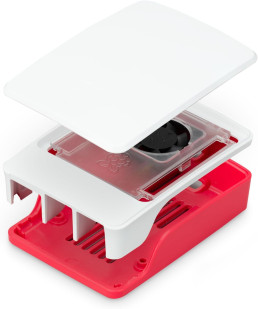
| Raspberry Pi 5 – Official case and cooling fan | |||
| Raspberry Pi 5 – Official power supply 27W | |||
| MicroSD Memory Card – 128GB Sandisk Extreme Plus |
Recommended speed class: C10, U3, V30, A2 Memory size as per your requirements (Min 32GB, Max 2TB) |
[Option 2] Raspberry Pi 5 with an SSD M.2 HAT Drive storage - Material List
| Image | Designation | Link | Comments |
|---|---|---|---|
| Raspberry Pi 5 – 16GB | 8GB RAM can be a bottleneck when running multiple Docker containers; 16GB provides comfortable headroom. | ||
| Raspberry Pi 5 – Official case and cooling fan | |||
| Raspberry Pi 5 – Official power supply 27W | |||
| MicroSD Memory Card – 128GB Sandisk Extreme Plus |
Recommended speed class: C10, U3, V30, A2 Memory size as per your requirements (Min 32GB, Max 2TB) |
Product Designation
Product Links
Comments
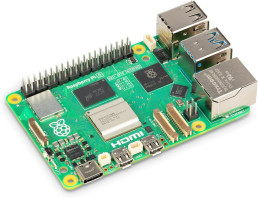
Raspberry Pi 5 - 16GB
8GB RAM can be a bottleneck when running multiple docker containers; 16GB provides comfortable headroom.


MicroSD Memory Card - 128GBSandisk Extreme Plus
Recommended speed class: C10, U3, V30, A2
Memory size as per your requirements (Min 32GB, Max 2TB)
Services
Access
Category
Sub-Domain
Information and Use Cases

n8n
Automation
n8n
Workflow automation tool used to connect different apps and create complex logic-based tasks. n8n is the brain and engine of what is happening behind the sebsvisual AI Mockup generator. It orchestrate visually without typing code the different actions to execute the workflows
⭐🔗 Official n8n website | 🔗 GitHub | 🔗 DockerHub


Ntfy
Automation
ntfy
A simple service that allows you to send push notifications to your phone/desktop via HTTP.
Services
Category
Access
Sub-Domain
Information and Use Cases

Nocodb
Productivity
nocodb
Turns your databases into a smart spreadsheet similar to Airtable for easy and visual data management. Provide an API HTTP Endpoint to be used as database backend for your application.
Personal use cases: Backend Database for my application that I am able to visually navigate into, Data automation with API Call from my n8n workflow. All kind of personal and ordered data (Replace Excel for all kind of List: List of Ideas, To-Do List…)
🔗 Official nocodb website | 🔗GitHub | 🔗 DockerHub

Excalidash
Whiteboard
excalidash
A virtual whiteboard for sketching diagrams, wireframes, and visual brainstorming. Used for visual note taking. Excalidash is a repository build on top of the Excalidraw whiteboard that add persistent storage, a dashboard to go through your whiteboards and live collaboration.
🔗 GitHub

Siyuan
Notes
postiz
All-in-one social media scheduling and management platform to automate content distribution on your social netowrk: X, instagram,Facebook,Pinterest…


Homepage
Dashboard
home
A highly customizable dashboard that acts as the front door to all the self-hosted services. Display a homepage with shortcuts to all my self hosted services
🔗 Official homepage website | 🔗 GitHub | 🔗 DockerHub
Services
Category
Access
Sub-Domain
Information and Use Cases

Cloudflared
Network
N/A
Creates a secure tunnel between your local network and Cloudflare without opening router ports.
🔗 Cloudflare zero trust | 🔗 Github | 🔗 DockerHub

Postgres
Database
N/A
The primary relational database used to store structured data for your various applications.

MongoDB
Database
N/A
A NoSQL document database used by apps that require flexible, JSON-like data storage.

MariaDB
Database
N/A

Redis
Database
N/A
An in-memory data store used primarily for caching and improving application performance.

SeaweedFS
S3 Storage
s3
Turns your databases into a smart spreadsheet similar to Airtable for easy and visual data management. Provide an API HTTP Endpoint to be used as database backend for your application.
Personal use cases: Backend Database for my application that I am able to visually navigate into, Data automation with API Call from my n8n workflow. All kind of personal and ordered data (Replace Excel for all kind of List: List of Ideas, To-Do List…)
🔗 Official nocodb website | 🔗GitHub | 🔗 DockerHub
Services
Category
Access
Sub-Domain
Information and Use Cases

Pgadmin
DB ADMIN
pgadmin
A web-based administration tool specifically for managing PostgreSQL databases.
Mongo Express
DB ADMIN
mongoexpress
An interactive web-based interface for viewing and editing your MongoDB collections.
🔗 Official mongodb website | 🔗 GitHub | 🔗 Docker

PhpMyAdmin
DB ADMIN
phpmyadmin
SeaweedFS UI
DB ADMIN
seaweedfs
The visual file and settings manager for browsing and managing files stored within your SeaweedFS clusters.
🔗 Official seaweedfs website | 🔗 GitHub | 🔗 DockerHub
Services
Category
Access
Sub-Domain
Information and Use Cases

Portainer
container
postiz
A graphical user interface for managing Docker containers, images, networks, and volumes. Used for debugging docker issues
🔗 Official portainer website | 🔗 GitHub | 🔗 DockerHub

Codeserver
container
postiz
A web-based VS Code instance allowing you to code in your browser from any device. Used on this stack to update the docker-compose files essentially and configuration files
🔗 Official Coder website | 🔗 GitHub | 🔗 DockerHub

Bezsel
Monitoring
postiz
A lightweight, self-hosted dashboard for monitoring server stats like CPU, RAM, and disk usage.
🔗 Official bezsel website | 🔗 GitHub | 🔗 DockerHub

Tugtainer
Update
postiz

Velld
Backup
postiz
Services
Category
Access
Sub-Domain
Information and Use Cases

Wordpress
Website
/
The core CMS used to power the sebsvisual website and blog content.

Opnform
Forms
form
Open-source form builder. Allow to create complex forms and embed them into the sebsvisual wordpress pages. Avoid the need of additional Freemium/Paid Wordpress plugins
🔗 Official opnform website | 🔗 GitHub | 🔗 DockerHub
Services
Category
Access
Sub-Domain
Information and Use Cases
Postiz
Social
postiz
All-in-one social media scheduling and management platform to automate content distribution on your social netowrk: X, instagram,Facebook,Pinterest…
🔗 Official postiz website | 🔗 GitHub | 🔗 DockerHub
Matomo
Audience
matomo
LinkStack
Social
link